Content

Why AI Productivity Tools Fail ADHD Founders (And What Actually Works)
You Have a Graveyard of Productivity Tools
Let me guess: you have a subscription to at least three tools you haven't opened in two weeks. Maybe Notion. Maybe a task manager. Maybe that AI assistant that promised to change your life and quietly became another bookmark you feel guilty about.
You're not disorganized. You're not lacking discipline. The tools failed you — and they failed you in a very specific, predictable way.
Here is the uncomfortable truth about almost every AI productivity tool on the market in 2026: they were designed for neurotypical workflows. They assume you will remember to open them. They assume context from your last session magically reconstitutes itself in your brain when you log back in. They assume the problem is information storage, when the actual problem is activation.
For ADHD founders, activation is everything.
The Activation Cost Problem
Activation cost is the mental energy required to start a task. For most people, it's a minor friction. For ADHD brains, it's a wall.
Every time you need a new app to capture a thought, you're not just opening an interface. You're spending working memory on:
Remembering the tool exists
Switching context from whatever you were doing
Re-orienting to the app's layout and logic
Re-entering the state of mind you were in when the thought occurred
Actually doing the thing
By step three, the thought is gone. So is the motivation.
The tools designed to solve this problem require you to have the exact cognitive function that ADHD impairs: proactive, structured, deliberate switching. It's a design flaw, not a character flaw.
The best AI tools for productivity for ADHD founders are not the ones with the most features. They're the ones with the lowest activation cost.

The Hub Problem
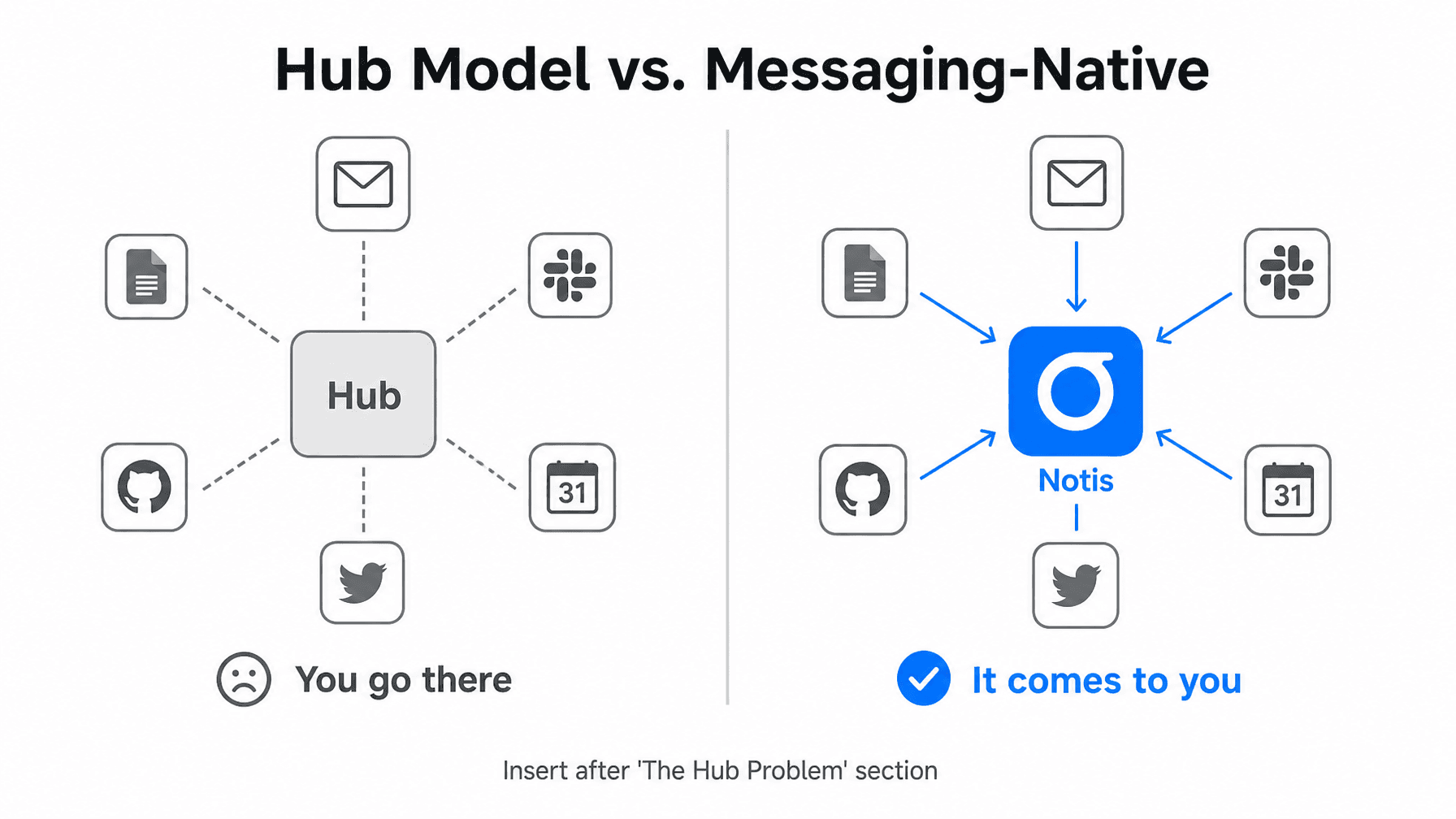
The past five years of productivity software have converged on one architecture: the hub. Notion became a hub. Tasklet is building a horizontal hub. Viktor lives in Slack, which is itself a kind of hub. The idea is that if you centralize everything in one place, you'll stop losing context.
That logic makes sense for neurotypical workflows. You build the hub, you go to the hub, the hub organizes your life.
For ADHD founders, the hub is a lie.
Not because the software is bad — some of it is genuinely well-built. But "go to the hub" is a command that requires you to interrupt whatever you're doing, navigate to a different environment, re-engage with that environment's logic, and then do the actual task. That's four steps before the first useful action. For a brain that runs on dopamine spikes and pattern-interrupt sensitivity, four steps is four reasons to abandon ship.
Everyone is building the hub. The founders who actually get things done have already skipped it.
What Messaging-Native Actually Means
There is a different design philosophy — one that doesn't get enough attention in most "best AI tools for productivity" roundups.
Instead of asking you to come to the tool, the tool lives where you already are.
You're already in WhatsApp. You're already in Telegram. You're already checking your messages seventeen times before breakfast. That's not a problem to fix — for ADHD brains, that's actually the highest-engagement interface in your life. It has notifications, social context, low friction. It is the one app you never forget to open.
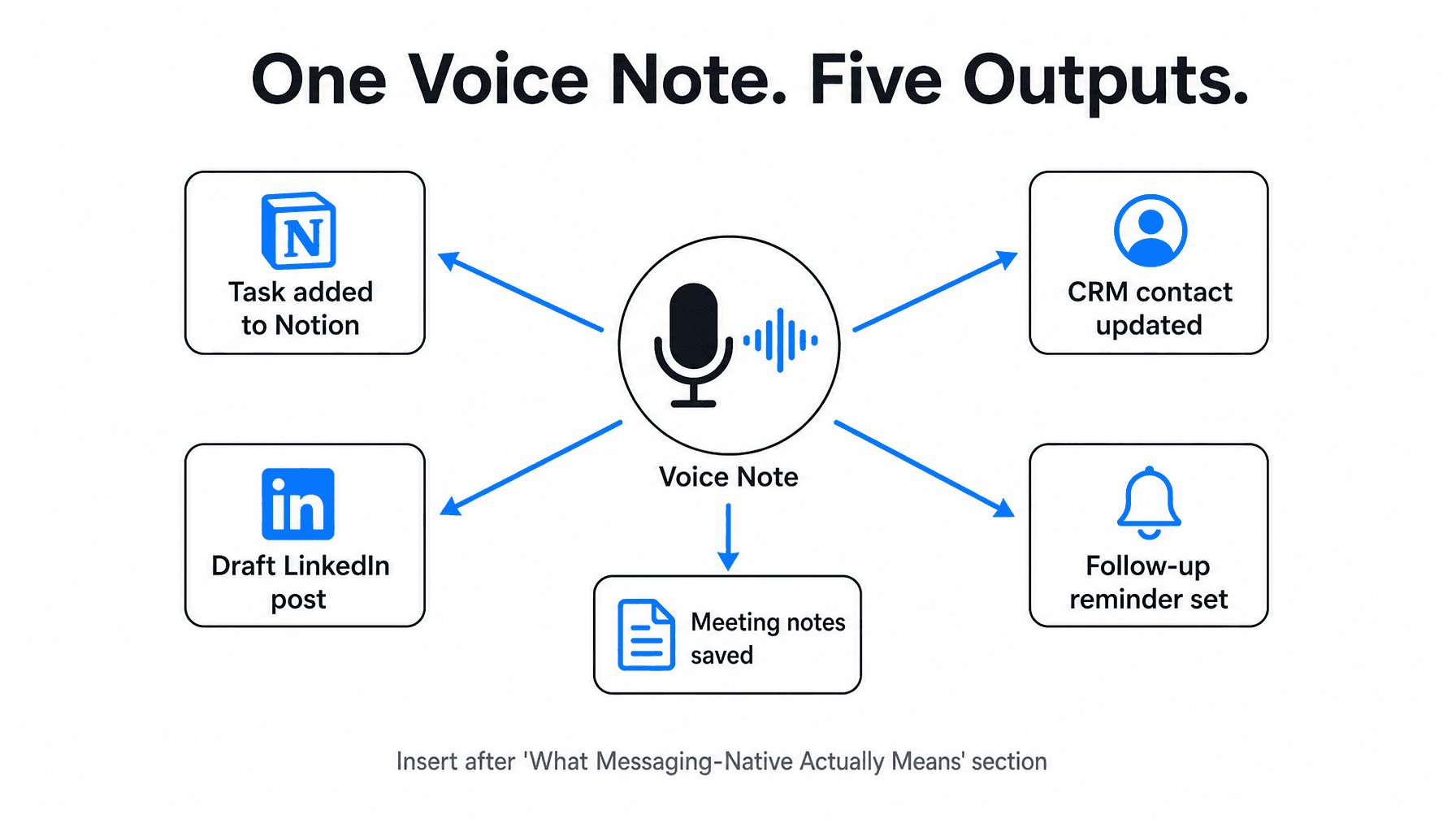
Messaging-native AI means your AI intern doesn't require a new tab. It lives in your existing conversations. You send a voice note on the way to a meeting. It captures the task, updates your CRM, drafts a follow-up, and sets a reminder — all before you've sat down.
That is not the same as a chatbot that answers questions. It's an AI that runs in the background of your actual life, handling the operational layer while you stay in execution mode.
One Voice Note. Five Outputs.
Here's a real use case: you finish a sales call and, walking back to your desk, you say: "Update the contact in Notion with what we discussed, set a follow-up for Thursday, draft a short thank-you message, add the deal to the pipeline, and remind me to send the contract tomorrow morning."
With a hub-based tool, that's five separate actions across multiple interfaces. You'll do two of them immediately and lose the other three to context decay within the hour.
With a messaging-native AI, you send one voice note to WhatsApp. All five things happen.
17,000+ founders already use Notis this way. Not because they're more organized than you — because they've stopped fighting their own operating system.
The Right Filter for AI Productivity Tools
When evaluating AI tools for productivity as an ADHD founder, the relevant question is not "what does this tool do?" It's: "where does this tool live?"
If the answer is "in its own interface," expect activation cost. Expect context decay. Expect a strong first week and a quiet abandonment by week three.
If the answer is "in the apps you already have open," you're onto something.
The tools that survive in ADHD workflows are invisible. You don't maintain them. You don't build habits around remembering to use them. They intercept your existing behavior — a voice note, a message, a quick text — and handle the operational layer behind the scenes.
That's the bar. Not feature count. Not AI model sophistication. Not how beautiful the dashboard looks. Does the tool reduce activation cost, or does it add to it?
Stop Collecting. Start Delegating.
You don't need more AI tools. You need the right architecture.
If you're an ADHD founder who has spent years collecting productivity tools that "almost" worked, the problem was never your commitment to the system. It was that the system required you to operate differently than your brain actually works.
The best AI tools for productivity, for this specific kind of founder, are the ones that live in your messages, handle the execution layer, and stay completely out of your way.
Try Notis at notis.ai — your AI intern in WhatsApp, Telegram, Slack, iMessage, and email. One message. Done.

Flo is the founder of Mind the Flo, an Agentic Studio specialized into messaging and voice agents.