Content

The Best Motion App Alternative for ADHD Founders Who Are Done Planning and Ready to Execute
#TLDR: Motion is a great AI scheduling tool. It decides when you should work on something. What it cannot do is actually work on it for you. If you have ADHD and you're running a company, the bottleneck is not your calendar — it's the gap between the thought and the action. The best Motion app alternative is one that closes that gap instead of prettifying it.
What Motion Actually Does (And Where It Stops)
Motion built something genuinely useful: an AI that looks at your task list, your deadlines, your calendar, and automatically schedules time blocks for everything. You do not drag tasks around. You do not play calendar Tetris. Motion handles it.
That is the pitch. The reality is a bit more specific. Motion is, at its core, an AI calendar. It tells you when to do things. It blocks time. It reschedules when your day blows up. It has expanded into docs, notes, reports, and what it calls "AI employees" — but the organizing logic is still the same: Motion manages your schedule so you can execute within it.
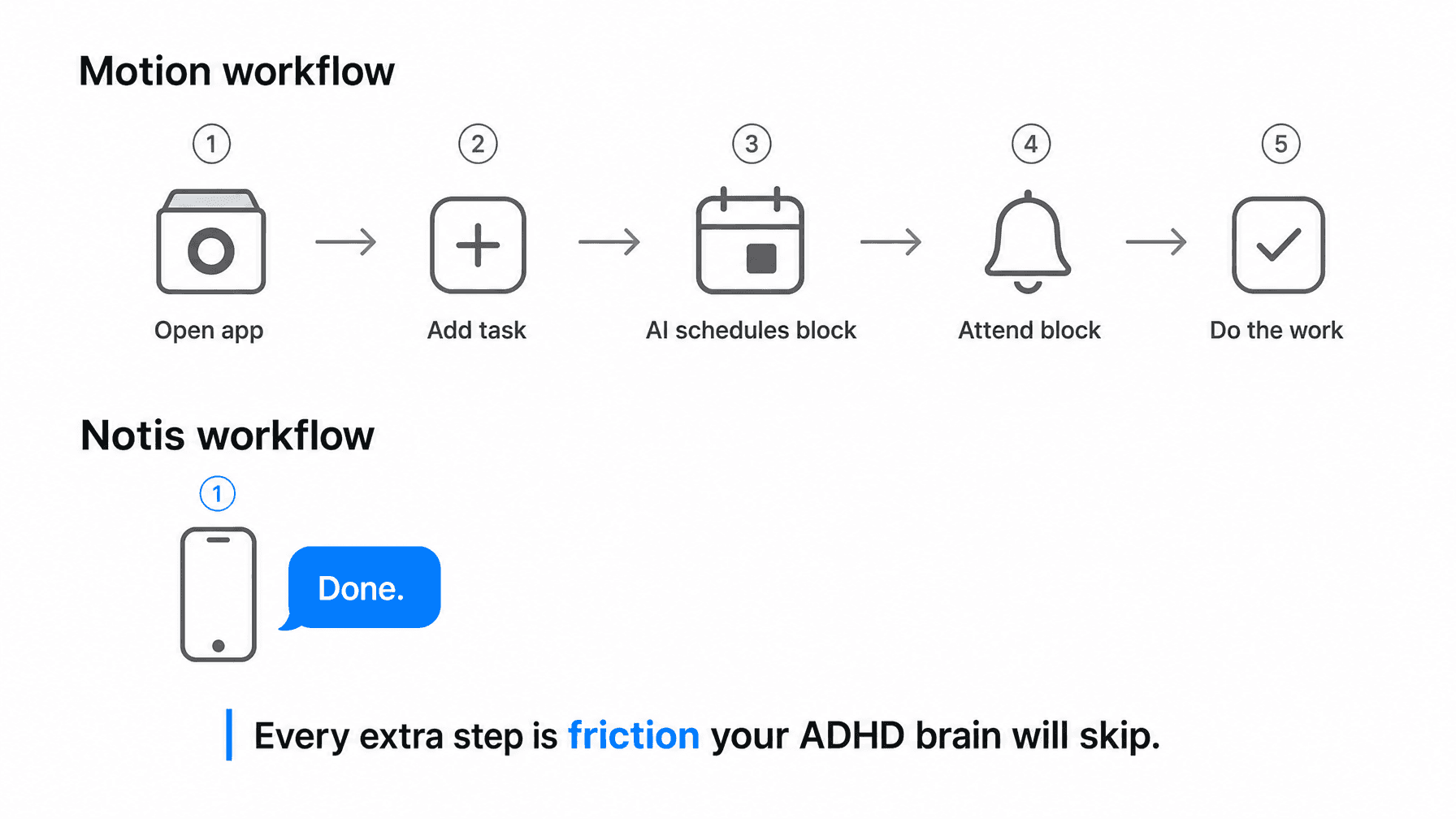
The gap Motion does not close: the actual execution. You still open Motion, add the task, wait for it to schedule a block, show up to that block, and then do the work yourself. Motion optimizes the container. The work is still yours.
For many people, that is exactly what they need. For ADHD founders, it is only half the equation — and not the harder half.
The ADHD Founder's Real Problem Is Not Scheduling
Ask an ADHD founder what kills their productivity and they will not say "I didn't know when to work on things." They will say: "I thought of it, I meant to do it, and then the thought evaporated before I had time to capture it, let alone act on it."
The bottleneck is the gap between the thought and the action. Not the scheduling of the action. The idea dies in the ten seconds it takes to open an app, navigate to the task list, type the task, and then wait for an AI to find space in your calendar.
Motion assumes you can reliably capture, categorize, and submit every task that matters. For neurotypical workers with structured days, that is a reasonable assumption. For founders running businesses in controlled chaos — where a task is born in a WhatsApp thread at 10pm and dead by 10:05pm — it is not.
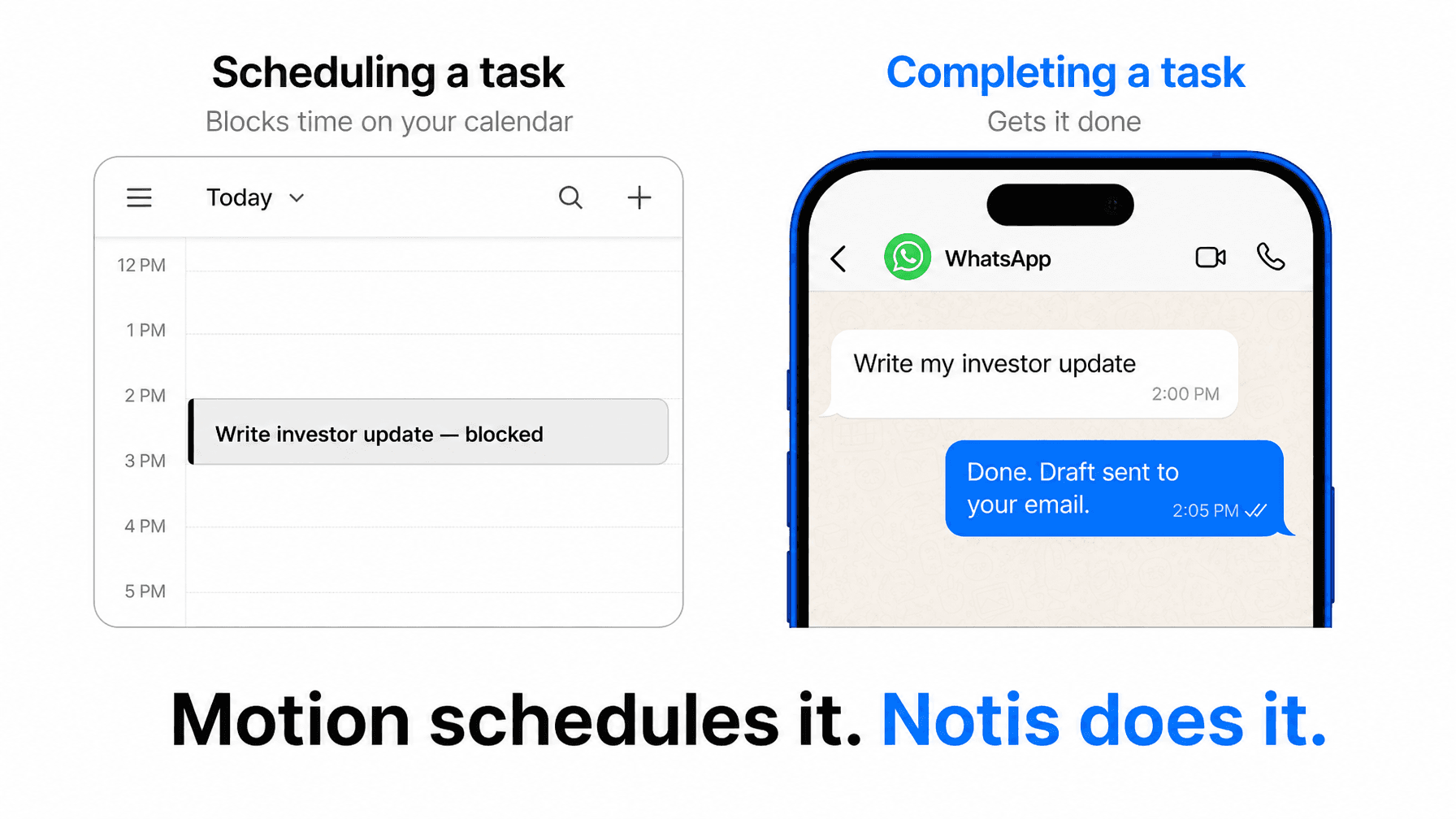
There is also a second layer: ADHD time blindness. Motion blocks out 2pm–3pm for your investor update. The block arrives. You see it. And then you are on a call, or mid-thought, or three tabs deep in something that felt urgent — and the block passes. Motion reschedules. You miss the next one too. Not because you did not know when to work on it, but because knowing and doing are different cognitive events.
What a Real Motion App Alternative Needs to Do
If you are looking for a Motion alternative because you want a prettier calendar or cheaper AI scheduling, there are plenty of options. Reclaim, Akiflow, Morgen — all solid tools that compete on the scheduling dimension.
But if you are an ADHD founder who has already tried the structured-calendar approach and found that the friction is not in the planning but in the doing, you need something structurally different. You need an AI that:
Lives where you already are, so capture requires zero context-switching
Executes tasks, not just schedules them — writes the update, logs the CRM entry, sets the reminder, drafts the email
Connects to your actual tools — Notion, Gmail, your CRM, your calendar — so it has context and can act with it
Has long-term memory, so it knows your business, your projects, and your patterns — not just today's task list
That is a fundamentally different category from an AI calendar. Motion organizes when. You need an AI that handles what.
Why Messaging-Native AI Wins for ADHD Founders
The insight that changes everything is simple: ADHD founders already live in WhatsApp, Telegram, iMessage, Slack, and email. Those are not tools they use occasionally. Those are where their actual thinking happens — the voice notes, the quick messages, the ideas captured mid-conversation.
A tool that requires you to open a separate app and interact with a separate interface will always lose to the friction of staying in whatever you are already doing. This is not a discipline failure. It is how ADHD brains work under cognitive load — the additional step, however small, is enough to break the chain.
Messaging-native AI eliminates that step entirely. The thought arrives. You send it as a message — the same way you would text a colleague. The AI acts on it. Done. No tab-switching, no task list navigation, no waiting for a calendar block to show up.
Notis vs Motion: The Core Difference
Notis is an AI intern that lives in your WhatsApp, Telegram, Slack, iMessage, and email. You message it the same way you would message a person. It writes your investor update, updates your CRM, sets your reminders, drafts your LinkedIn post, and adds the follow-up to Notion — all from one voice note or text message.
That is not a scheduling assistant. That is execution infrastructure.
Here is what the comparison actually looks like in practice:
Motion: You add a task, Motion schedules a 90-minute block on Thursday, Thursday arrives, you sit down and write the investor update yourself.
Notis: You send a voice note saying "write a draft of my investor update based on my last Notion notes," Notis writes it and emails you the draft. Done in two minutes, from your phone, while you are walking to a meeting.
The other differences that matter for ADHD founders:
Long-term memory: Notis ingests your Notion, Gmail, Google Drive, and website — so it knows your business context, not just your to-do list. Motion knows your tasks and your calendar.
1,000+ integrations: Notis connects to over a thousand apps. You do not manage those integrations — you just tell Notis what to do and it handles the routing.
No new app: You never open Notis in the way you open Motion. It is already in the tools you use all day.
Pricing: Notis Pro starts at $13/month. No credit system, no per-action billing surprises.
Who Should Still Use Motion
Motion is the right tool if your primary pain point is calendar management and task prioritization. If you have a relatively structured day, a finite set of ongoing projects, and you need a system that ensures nothing falls through the cracks in terms of timing, Motion delivers that well.
Teams with predictable project loads and defined workflows can benefit from Motion's scheduling logic. It is genuinely good at what it does.
But if you are a solo founder whose day is reactive, whose best ideas surface in WhatsApp threads at midnight, and whose cognitive load means that any tool requiring deliberate navigation will be abandoned within a week — you are not in Motion's target use case. You never were.
The Honest Comparison
Motion is an AI that helps you plan. Notis is an AI that helps you do. Those are not competing on the same axis — they are solving different problems.
The ADHD founders who trust Notis — 17,000+ of them — are not looking for a better calendar. They are looking for a tool that embraces the chaos of their days rather than trying to impose structure on it. They want something that works the way they work: fast, conversational, in the tools they already have open.
If that is you, Motion will feel like a second job. Notis will feel like you finally hired someone who actually shows up.
Try Notis
Notis connects to WhatsApp, Telegram, Slack, iMessage, and email in under 30 seconds. No dashboard to configure. No calendar to import. Just send a message and see what happens. Start at notis.ai.

Flo is the founder of Mind the Flo, an Agentic Studio specialized into messaging and voice agents.